
Poppo Live Complete Guide
Step-by-step tutorials for agents and hosts — registration, verification, agency setup, and withdrawals.
Choose Your Path
Whether you want to become an agent managing hosts or a host creating content, pick the guide that matches your role.
Tap a card below to jump straight to that section.
Agent Setup Guide
Registration, agency activation, and sub-agent invitations.
View full become-an-agent pageHow to Become an Agent
Follow all 7 steps below. Verification takes 1-3 business days.

-
Download Poppo Live
Install the app from Google Play or the App Store.
-
Create an account
Sign up on the Poppo Live app with your preferred login method.
-
Copy your ID from profile
Open your profile and copy your unique Poppo ID.
-
Click the application link
Open the agency registration link to start your application.
-
Paste your ID and click Get
Enter your Poppo ID in the form and tap ‘Get’ to request a code.
-
Receive your verification code
Check app messages for the code sent to your account.
-
Enter code to create your agency
Submit the verification code to complete agency registration.
Ready to start? Join as Agent Now
How to Invite Sub-Agents
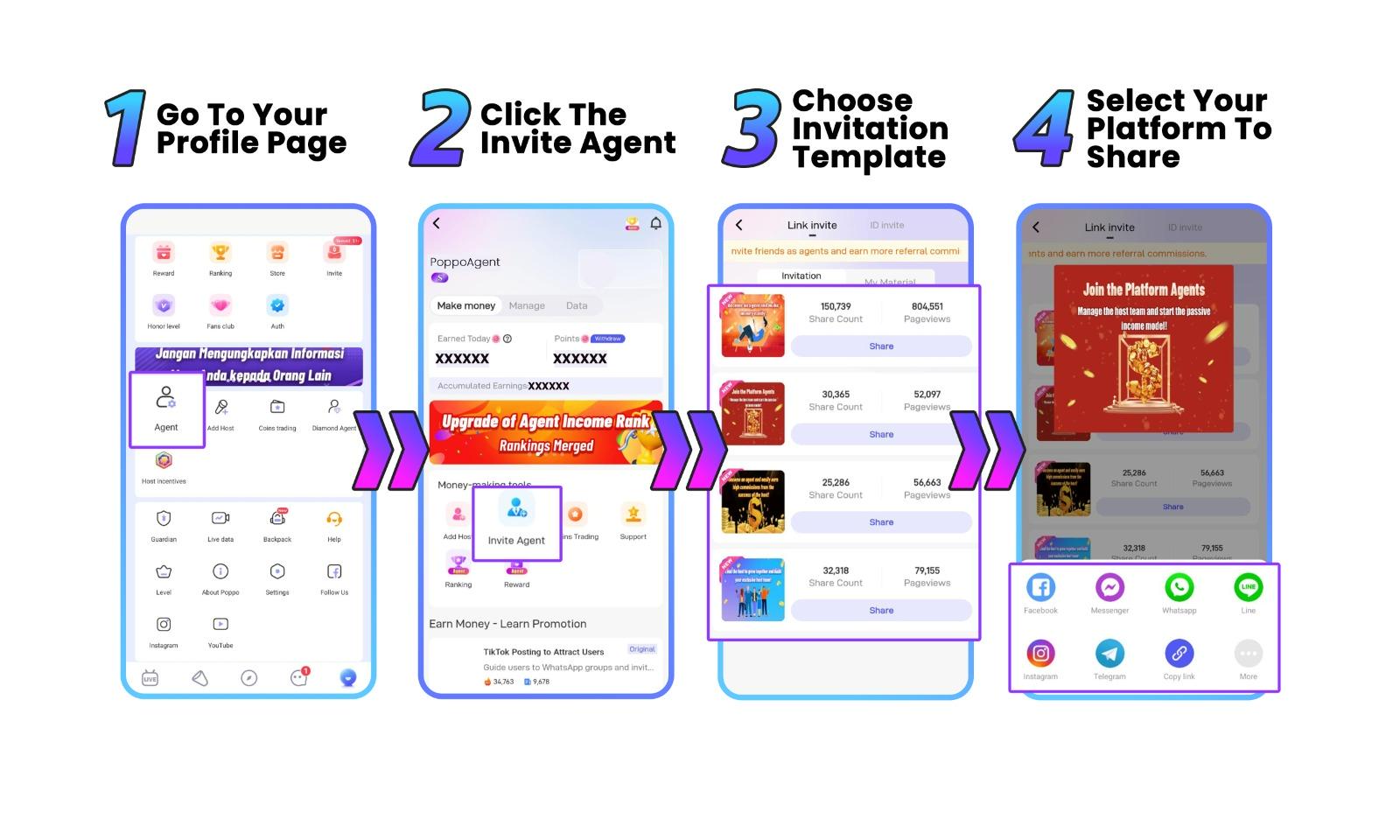
Grow your agency network by inviting sub-agents. Follow all 5 steps below in the app.
-
Log in to your agent account
Open Poppo Live and sign in with your registered agent account.
-
Open Agent Center
Go to your profile page and tap the Agent menu to open Agent Center.
-
Select Invite Agent
Under money-making tools, tap Invite Agent to open the invitation screen.
-
Copy your invitation link
Choose an invitation template, tap Share, then copy your unique sub-agent invite link.
-
Share with potential sub-agents
Send the link via WhatsApp, Telegram, or your preferred platform to recruit new sub-agents.
For commission rates and rewards, see the full become-an-agent page.
Host Setup Guide
Registration, face verification, and joining your agency.
View full become-a-host pageHow to Become a Host
Follow all 4 steps below. Then complete face verification — approval takes 1-3 business days.

-
Download Poppo Live
Download the app from the official link and install it on your device.
-
Create your account
Sign up and complete your profile with the following details:
- Nickname
- Date of birth
- Country
- Gender
- Referral ID — use 3435306
-
Open My Agency
Go to Profile and tap ‘My Agency’ in the app menu.
-
Join your agency
Enter the agency ID that invited you and click ‘Submit’ to connect with your agency.
Face Verification Process
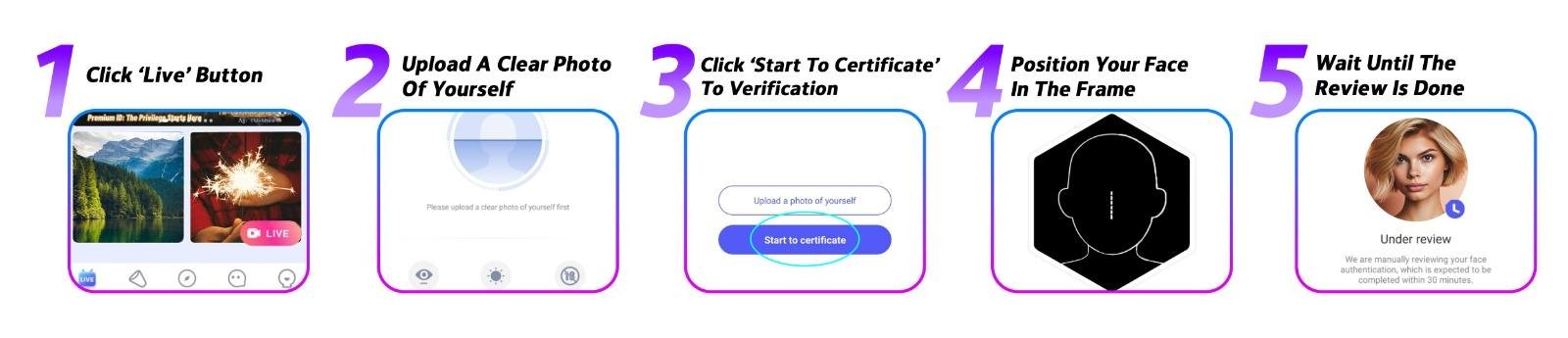
Follow all 5 steps below in the app after registration. Verification takes 1-3 business days.
-
Open Live mode
Click the ‘Live’ button on the homepage to begin.
-
Upload your photo
Upload a clear, well-lit photo of yourself.
-
Start certification
Click ‘Start to Certificate’ to launch the verification flow.
-
Position your face in the frame
Follow on-screen instructions: blink, turn your head, and smile.
-
Wait for approval
Approval typically takes 1-3 business days. You’ll be notified in the app.
Ready to go live? Start Streaming Today. For earning charts and host rewards, see the full become-a-host page.
How to Withdraw Your Earnings
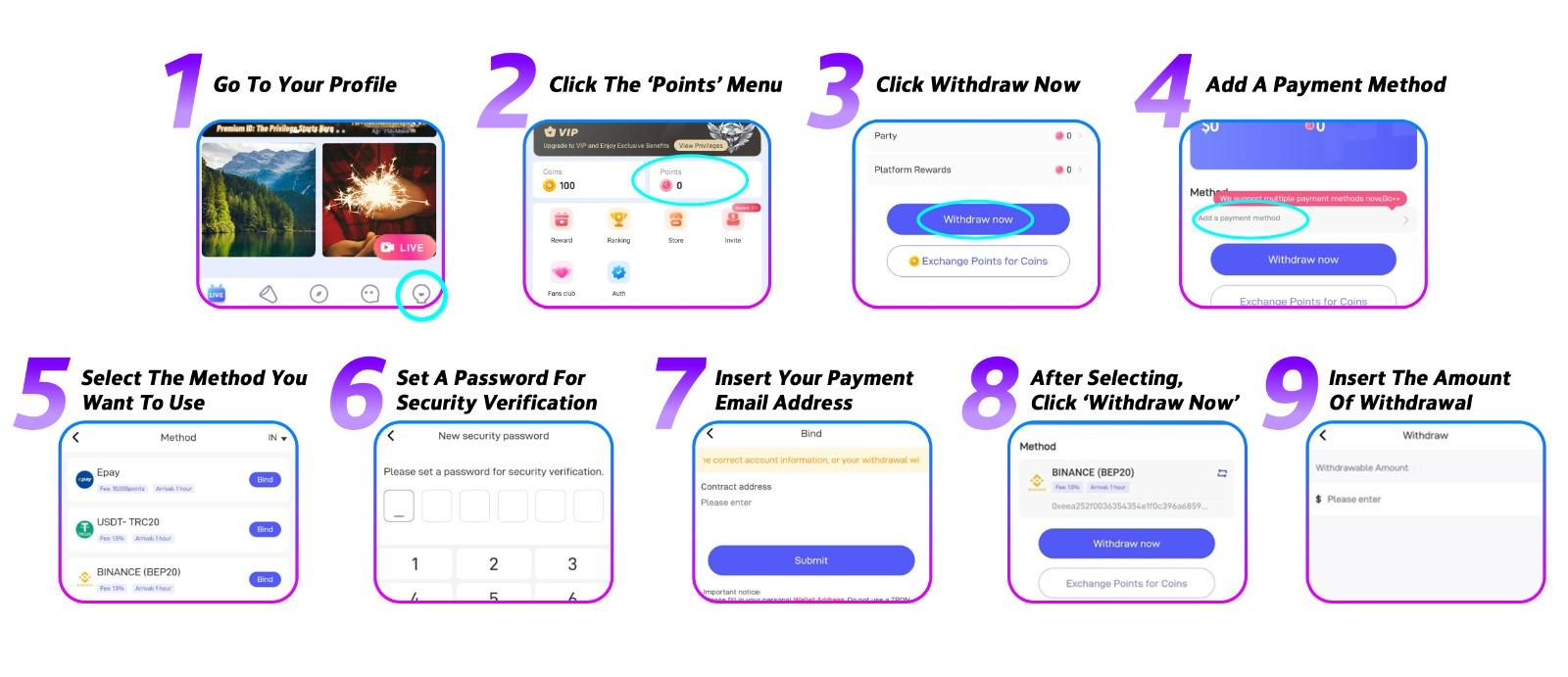
Follow all 9 steps below. Funds arrive within 24 hours once submitted.
-
Log in to the app
Open Poppo Live with your agent or host account.
-
Open Points from profile
Go to your profile page, then click ‘Points’.
-
Click Withdraw Now
Tap the ‘Withdraw Now’ button on the Points screen.
-
Add a payment method
Click ‘Add a payment method’ to get started.
-
Select your method
Choose the payout method you want to use and bind it.
-
Set a security password
Create a password for security and verification.
-
Enter payout email
Enter your payout email address for the payment method.
-
Click Withdraw Now again
After your method is set up, tap ‘Withdraw Now’.
-
Enter withdrawal amount
Enter the amount you’d like to withdraw. Minimum payout is $10.
Common questions
Quick answers for getting started, verification, and support.
Download the app, create your account, and complete verification immediately. For hosts, use Referral ID 3435306 and complete face verification within 24 hours. For agents, activate your agency link right after registration.
If verification fails, you can retry immediately. Ensure you’re in a well-lit room, remove all accessories (glasses, hats, masks), use the front camera, and follow on-screen instructions carefully. Avoid backlighting and keep your face clearly visible.
You can contact Poppo Live support 24/7 via WhatsApp at +601172243921 or Telegram at @PoppoLiveService. Support is available for both agents and hosts.
Yes, you can have separate accounts for agent and host roles. However, each account requires separate registration and verification. Most users choose one primary role to focus their efforts.
Need More Help?
Our support team is available 24/7 on WhatsApp and Telegram for agents and hosts.