
Poppo Live isn’t just for live streamers. If managing people and building a team is more your strength, the platform’s agent program gives you a compelling path to earn without ever going on camera. Agents work in a support and recruitment capacity, helping bring talented hosts onto the platform and growing their roster over time. Before getting started, here’s a look at what the Poppo Live agent sign up process involves.
Poppo Live Agent Sign Up Step by Step
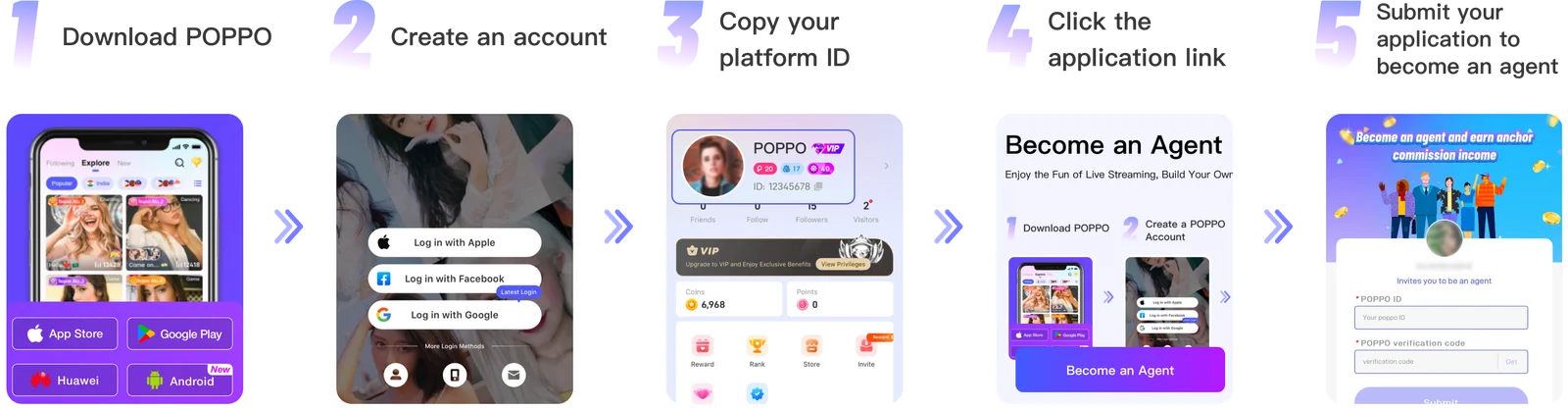
Step 1: Install the Poppo Live App
Click the download link on this page to go to your app store and get Poppo Live installed. Launch the app once it’s ready.
Step 2: Set Up Your Account
Register an account directly within the app. You can use Google, Facebook, Instagram, an email address, or your phone number to sign up.
Step 3: Find Your Account ID
Once you’re registered, go to your profile. Just below your profile picture, you’ll find your account ID, copy it and keep it ready for the next step.
Step 4: Access the Registration Form
Open the agency registration link provided on this page to reach the application form.
Step 5: Complete and Submit Your Application
Enter your account ID in the form and press ‘Get’ to trigger a verification code, which will appear in your ‘System Message’ inbox inside the app. Fill in both fields and press ‘Submit’ to finalize your registration.
Common Registration Issues & How to Resolve Them
- Verification code not arriving
An incorrectly entered account ID is almost always the culprit. Verify your ID once more before retrying. If it’s correct and the code still isn’t coming through, switch to a different internet connection and give it another try.
- Can’t get the registration link to open
Check that you’re using the correct link from this page. Ad blockers are a known cause of this issue, so try disabling yours temporarily. If neither helps, wait a bit and try again.
Agency Registration FAQs
- What can I earn as an agent?
Agents on Poppo Live have access to several income streams, commissions from gifts, earnings generated by their hosts, and income from sub-agents. The more active your team, the more you earn. - Is it possible to own more than one agency?
No. Each individual can only hold one agency on the platform. - Can I fix a username mistake after registering?
Yes, head to your profile settings at any time to update your username. - What if I entered the wrong gender or country?
Unfortunately, both fields are locked after registration. Creating a new account with accurate information is the only way to correct this. - Are hosts able to switch agencies?
They can, but the process requires them to submit a departure request and get it approved by their current agency first. - Do agents get to live stream too?
Absolutely. There are no restrictions on agents streaming, all Poppo Live agents can go live just like any host.
Poppo Live Agent Sign Up is Quick
Getting your Poppo Live agent account up and running is a quick and simple process. Once registered, you’re ready to start recruiting, growing your team, and taking full advantage of what the platform offers. Still have questions? Don’t hesitate to contact our support team or browse our blog for more helpful content.