Whether you’re a Poppo Live host cashing out gifts or an agent collecting commissions, getting paid should be the easy part. This complete tutorial covers what you need to have in place before withdrawing, how to withdraw your earnings on Poppo Live process step by step, answers to common questions, and fixes for the issues that come up most often.
Withdraw Your Earnings Poppo Live Tutorial
Completed Face Verification. This is a must for both hosts and agents. Hosts need it done prior to their first live stream; agents need it completed before their first withdrawal. See our dedicated face verification guide if you haven’t done it yet.
Linked Email or Phone Number. Your Poppo Live account needs a verified email address or phone number attached to it. Go to your profile and confirm this is set up before attempting a withdrawal.
Balance of at Least $10 USD. You won’t be able to initiate a withdrawal until your balance reaches the $10 minimum threshold.
Working Payment Account. Poppo Live supports bank transfers and e-wallets. Make sure whichever account you plan to use is active. More on supported options appears later in this guide.
Step-by-Step Withdrawal Instructions
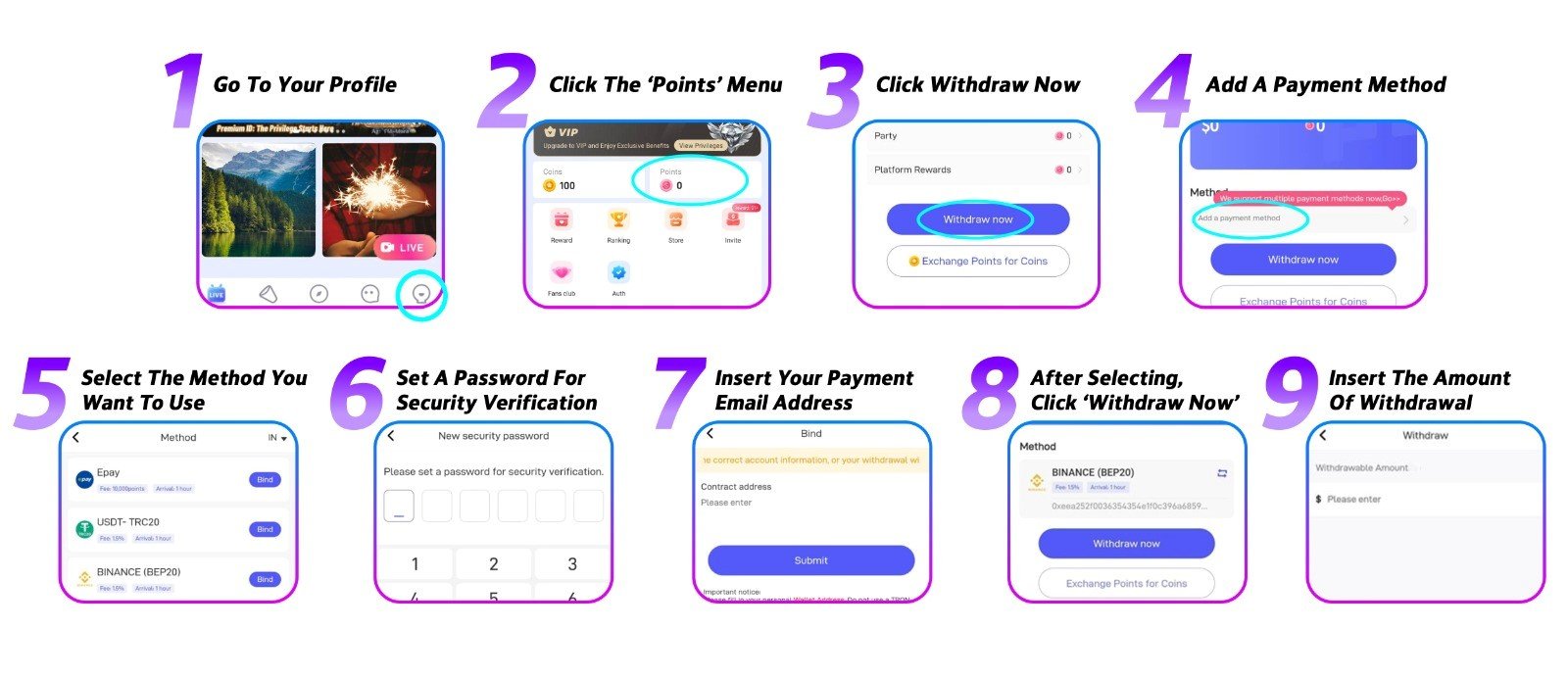
Step 1: Visit Your Profile
Open the app and tap into your profile.
Step 2: Tap the ‘Points’ Menu
From your profile, open the ‘Points’ section to see your balance.
Step 3: Hit ‘Withdraw Now’
Tap the ‘Withdraw Now’ button to kick off the withdrawal flow.
Step 4: Set Up a Payment Method
New to withdrawals? You’ll need to add a payment method before going further. Tap ‘Add a Payment Method’ to begin.
Step 5: Pick Your Preferred Method
Choose from Epay, USDT, PayPal, bank transfer, or e-wallet. Your available options may differ based on your country.
Step 6: Create a Secure Transaction PIN
Set a PIN that you’ll use for every future withdrawal. Steer clear of simple sequences — choose something that’s genuinely hard to guess.
Step 7: Bind Your Payout Email
Enter the email address associated with your payment account to link it to your profile.
Step 8: Go Back to ‘Points’
Return to the ‘Points’ menu and tap ‘Withdraw Now’ one more time.
Step 9: Input Your Amount and Confirm
Enter the amount you want to withdraw and submit. Processing typically takes up to 72 hours.
Withdraw Earnings Poppo Live FAQs
- What’s the smallest amount I can withdraw?
You’ll need at least $10 USD in your balance. All withdrawal amounts must be in multiples of 10, for instance, $10, $20, $50, or $200. - What payment options does Poppo Live offer?
Supported methods include Epay, USDT, PayPal, bank transfer, and e-wallet, though availability depends on your region. Check the app to see what’s offered where you are. - Will I be charged a transfer fee?
It varies by payment provider. Certain third-party services apply their own fees, and the amount differs from one to the next. Look into your preferred provider’s fee structure ahead of time. - Can hosts withdraw independently?
Yes, completely. Hosts can request a withdrawal at any point once their balance qualifies. - What if I linked the wrong account?
You can unlink or swap out a payment account from your profile at any time — there’s no waiting period or restriction.
Solving Common Withdrawal Problems
- My withdrawal didn’t go through
This can happen for several reasons: wrong payment details, a suspended account, or a payment method that isn’t supported on our end. Switch to a different method if possible and reach out to our support team for help. - I can’t find the withdraw button
A missing withdraw button almost always means a requirement isn’t met. Check your face verification status, your verified contact details, and whether your balance clears $10 USD. - My preferred payment method isn’t listed
Not all methods are available in every region. Work with what’s currently showing for your area. - My withdrawal hasn’t arrived yet
Most withdrawals clear within three business days. If yours is overdue, contact our support team and we’ll investigate.
Withdraw Your Earnings on Poppo Live With Ease
Withdrawing on Poppo Live is a straightforward process once everything is lined up correctly. Hosts and agents alike just need to ensure their payment information is accurate and their account is in good standing before submitting. Have more questions or hit a snag? Our support team is always a message away. You can also browse our blog for more practical tips and tutorials.