Now that your Poppo Live host account is registered, face verification is the one remaining task standing between you and your first live stream. Every host on the platform is required to go through this process before going live or making a withdrawal. It’s fast, and this guide will walk you through exactly what to do on Poppo Live face verification, also on how to handle any issues that come up along the way.
Poppo Live Face Verification Step-by-Step
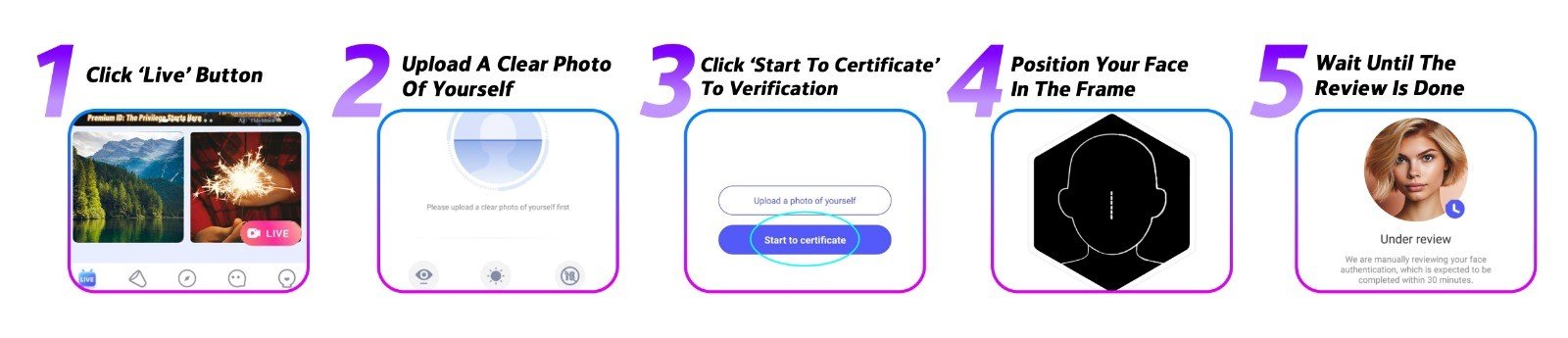
Step 1: Open the App and Go to the Homepage
Launch Poppo Live and navigate to the homepage. From there, tap ‘Live’ to enter the face verification section.
Step 2: Submit a Photo
You’ll be asked to upload a current photo of yourself, make sure it’s well-lit and your face is clearly visible. Hit ‘Confirm’ once you’re ready to proceed.
Step 3: Tap ‘Start to Certificate’
This launches the real-time portion of the verification. Find a good spot with decent lighting before moving forward.
Step 4: Complete the On-Screen Steps
The app guides you through the process in real time. Keep these in mind for a smooth experience: use a well-lit room without backlighting, remove glasses, hats, masks, or anything that covers your face, and use your front camera in clear conditions.
Step 5: Submit and Wait
After completing all steps, go ahead and submit. The review process takes anywhere from a few minutes to three business days. If your verification is approved, you’re officially a verified host. If not, you can try again right away.
Troubleshooting Face Verification Issues
- The app won’t access my camera
Make sure camera permissions are enabled for Poppo Live in your phone settings, and that your app is updated to the latest version. Still not working? Try restarting your device or using a different phone. - My verification has been under review for a while
Standard reviews take just a few minutes, but manual cases can take up to three business days. If yours has exceeded that timeframe, reach out to our support team. - My verification got rejected
This usually happens when the video doesn’t match the profile photo, or when someone else appears in the camera frame. Check your profile photo and run through the process again.
Poppo Live Face Verification FAQs
- What happens if I never complete face verification?
You’ll be locked out of going live and withdrawing earnings until it’s done. It’s a mandatory step for every host. - Is there a limit on how many times I can retry?
No, feel free to redo the video steps as many times as necessary. There’s no penalty for multiple attempts. - Why does Poppo Live ask for re-verification sometimes?
Periodic re-verification is a standard security practice on the platform. When prompted, just complete it quickly to keep your account active. - My verification keeps failing, what now?
Retry as many times as needed throughout the day. If you reach the daily limit, wait 24 hours and try again. If rejections keep happening, contact our support team for help.
One Step Closer to Your Career
Don’t put off face verification, it’s the one step that unlocks your ability to go live and get paid on Poppo Live. The process is short, and with this guide in hand, you’re well-prepared to get through it. Any questions? Our team is here for you, drop us a message or head to our blog for more helpful content.